
Silly Fun Smile Live Wallpaper
Fusion Flow TechPersonalization
4.862.00 Reviews
- Version
- 1.1.1
- Installs
- 10.00M
- Age Rating
- Everyone
Screenshots
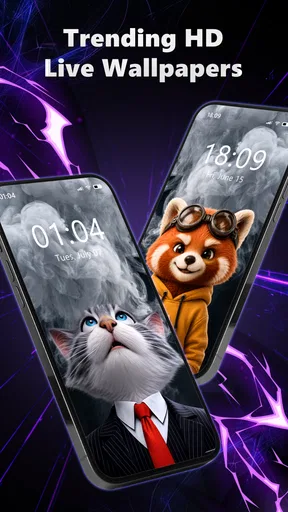
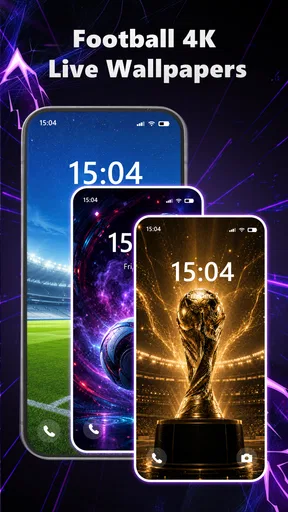
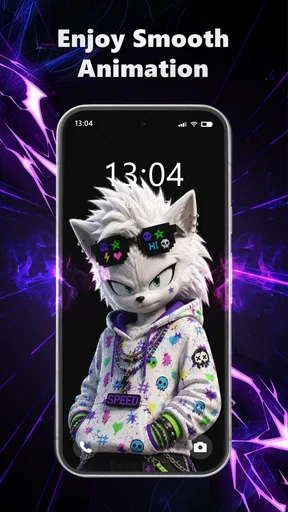
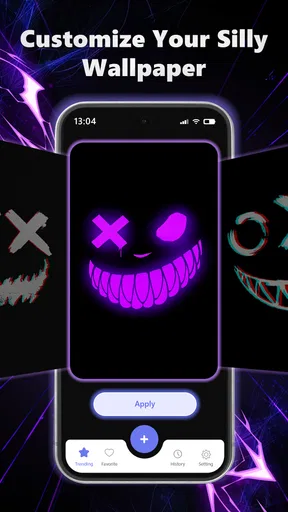
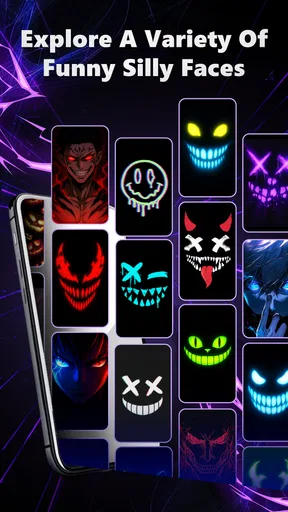
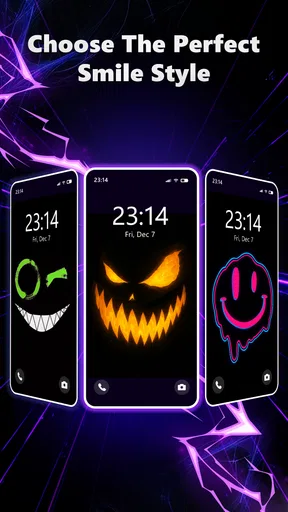
Our Review of Silly Fun Smile Live Wallpaper
 Analysis by Appyee
If you’re deciding whether a playful animated background belongs on your phone, I’d judge Silly Fun Smile Live Wallpaper by a simple question: do you want your screen to feel lively, or do you prefer it to stay quiet and purely practical? I enjoy a bit of personality on a home screen, and this app is aimed squarely at that first group. It is a free personalization app from Fusion Flow Tech, with optional in-app purchases priced from $2.99 to $10.99 per item. Its Everyone age rating makes it suitable for a broad audience, though the lighthearted look will not suit every taste.
What the daily setup is really for
The best way to approach an animated wallpaper is to treat it as a small visual accent, not a replacement for the useful parts of your phone. I’d start by picking a smiley style and background that make app icons easy to read, then leave the wallpaper in place for a full day rather than judging it from the preview alone. A design that looks cheerful in a setup screen can feel busy when notifications and icons sit over it.
That makes this a good fit for someone who checks their phone often and wants a quick, low-effort change to the home screen. For example, if I use my phone during a long commute, a silly expression can add a moment of levity without asking me to open a separate app or follow a routine. The benefit is modest, but that is the point: the wallpaper is decoration woven into a familiar habit.
I would be more cautious if you rely on a clean home screen for work, use a detailed photo as a personal background, or find movement distracting. A static image is the better choice when legibility and calm matter more than animation. The wallpaper also cannot make a stressful day disappear; I see it as a small mood cue, not a wellness tool or a reason to expect a lasting change in how I feel.
First impressions and installation
When I first stumbled upon Silly Fun Smile Live Wallpaper, I was immediately intrigued by its vibrant and playful design. The download was straightforward and quick, which is always a plus in my book. Once installed, you’re greeted with a simple interface that lets you customize your wallpaper with ease.
Setting it up was a breeze. You simply choose your favorite smiley face design, adjust the animation speed, and voila—your screen is transformed into a cheerful hub of happiness. The app is lightweight, so it doesn't hog your phone's resources, which is a relief for those of us with older devices.
In practical use, I’d make the setup decision in two passes. First, choose an expression and color combination that feels fun; then look at the screen with your usual icons in place and check whether anything important becomes harder to spot. This is a useful distinction with animated backgrounds: the wallpaper can look excellent on its own but compete with the home screen once the phone is arranged for everyday use.
Settings and habits that make a difference
I’d use the settings as a small, repeatable experiment: choose a smiley and background, check how clearly your icons show, then adjust the movement only after living with that combination for a while. That makes it easier to tell whether a change genuinely improves the screen or just feels exciting because it is new. The next section looks at how to keep that playful look comfortable in ordinary use.
Customization galore
One of the standout features is the level of customization offered. You can choose from an array of smiley faces, each with its own unique expression. Whether you’re feeling cheeky, goofy, or just plain happy, there’s a smiley to match your mood. Plus, you can tweak the background colors and animation effects to suit your personal style.
The app also allows you to set the frequency of animation. So, if you prefer a more subtle movement on your screen, you can dial it down. Or, if you’re like me and love a lively display, crank it up to the max. It’s these little touches that make the app feel personalized and fun.
My first recommendation is to tune movement after choosing a background, rather than turning everything up immediately. A busy visual combination may look entertaining for a minute but become tiring when you unlock your phone repeatedly. I’d start with a gentler animation setting, use the phone as usual, and increase the activity only if the screen still feels too static. That simple check helps preserve the playful effect without letting it dominate every glance.
There is also a useful trade-off between a strong personality and a screen that feels easy to scan. If you keep many icons on the home screen, a calmer color and less movement will usually make the layout more comfortable. If you use a sparse screen, you have more room to let the smiley design stand out. I would choose for the way the phone is actually organized, not just for the wallpaper preview.
For a repeatable routine, I’d settle on one design for several days before changing it again. That gives you time to notice whether the animation is genuinely pleasant or merely novel. If you regularly switch between playful and restrained looks, save a mental note of the combination you liked most so you can return to it without starting the whole decision from scratch. This is not a hidden feature; it is simply a practical way to avoid endless tweaking.
Performance and usability
Now, let’s talk about performance. I was pleasantly surprised by how smoothly the animations ran. Even when multitasking, the live wallpaper didn’t cause any noticeable lag or stutter. The developers did a great job optimizing the app, ensuring it runs smoothly across various devices.
The user interface is intuitive and easy to navigate. Even if you’re not tech-savvy, you’ll find it easy to switch between designs and adjust settings. The app doesn’t bombard you with ads, which is a refreshing change from most free apps these days.
Live wallpapers do have a different role from static backgrounds and icon packs. A static picture offers more control over the exact image and never moves; an icon pack changes the look of shortcuts but leaves the background alone. This app makes most sense if the animated smiley is the part you want to notice. If you want a complete visual redesign, or if you mainly want coordinated icons and widgets, those alternatives may be more satisfying.
It is also worth separating initial smoothness from long-term preference. A wallpaper can run well and still not be right for your habits. I’d check how it feels while opening the camera, messaging, or other everyday apps, and whether the motion keeps drawing my attention when I am trying to do something quickly. If it becomes visual noise, reducing the animation or returning to a static background is a sensible choice, not a failure to use the app properly.
Joy in every glance
Every time I unlock my phone, I can’t help but smile. There’s something genuinely uplifting about the silly faces that greet me. It’s a small reminder to not take life too seriously, and sometimes that's exactly what we need.
For those who love to share, there’s an option to save your favorite designs and share them with friends. It’s a fun way to spread some joy and maybe even convince others to join in on the fun.
A realistic way to use it is to set the wallpaper during a quiet moment at home, then see how it looks during a normal day of calls, messages, and quick checks. If the design makes you smile without slowing you down, it has earned its place. If you only enjoy it while actively adjusting it, the novelty may not last. I’d also consider whether sharing a design is something I will actually do; the stronger reason to install it is enjoying the screen yourself, not expecting friends to adopt the same look.
The app is free to try, while optional purchases fall between $2.99 and $10.99 per item. I’d spend time with the free experience first and decide whether any paid option would change the way I use the wallpaper before buying. Since the core appeal is a cheerful animated background, paying only makes sense if the available customization is something you personally want, rather than assuming a purchase is necessary to make the idea worthwhile.
Where it fits—and where it doesn’t
The app is currently at version 1.0.9 and supports Android 7.0 or later. It has passed one million installs, with an average rating of 3.6 from around 1.9 thousand ratings and 27 written reviews. I read that middle-of-the-road rating as a reminder that a very specific visual style is naturally subjective: people who like goofy animated faces may enjoy it, while those seeking a polished, understated screen may not.
Released on December 21, 2025, the app has a focused premise rather than the broad toolkit of a full phone-theme suite. That focus can be a strength when all you want is an expressive moving background, but it also sets expectations: I would not choose it for deep home-screen reorganization, productivity features, or a library of unrelated personalization tools. It is best judged on whether its smiley-centered look suits your own screen.
One question people often have about a live wallpaper is whether they need to keep reopening the app to enjoy it. The practical appeal is that the chosen background becomes part of the home-screen experience, so the point is to set it once and let ordinary phone use provide the repeated exposure. I’d still revisit the controls if the movement feels too prominent after a day or two, rather than assuming the first setting is the only sensible one.
Another common concern is whether the animation will suit an older or less powerful phone. My experience was smooth, but I would avoid making a blanket promise for every device. Start with a restrained animation setting and see how the phone feels in your normal routine; that is a better test than judging performance from a brief look. If you notice unwanted distraction or sluggishness, a static wallpaper is an easy alternative.
Final thoughts
In a world where apps come and go, Silly Fun Smile Live Wallpaper stands out for its charm and simplicity. It’s not trying to be the next big thing; instead, it focuses on bringing a bit of joy to our daily routines. And honestly, who couldn’t use a little more of that?
If you’re looking for a way to brighten up your phone and your day, give this app a whirl. It’s a delightful reminder that sometimes, it’s the little things that make the biggest difference. So go ahead, download it, and let those silly smiles brighten up your screen—and your mood.
My final recommendation is for someone who wants a deliberately playful home screen and is happy to adjust movement until it feels comfortable. I’d skip it if you want a perfectly still display, a more serious visual style, or a broad set of customization tools. For everyone else, the sensible approach is to begin simply, check readability with your real icon layout, and keep only the settings that remain enjoyable after the novelty wears off.
Verdict
Strengths of Silly Fun Smile Live Wallpaper
- Vibrant and eye-catching visuals.
- User-friendly customization options.
- Low battery consumption.
- Smooth performance on most devices.
- Regular updates with new features.
Limitations of Silly Fun Smile Live Wallpaper
- Limited free version features.
- Ads can be intrusive at times.
- Compatibility issues on older devices.
- Lacks interactive elements.
- No offline functionality.
Other Releases by Fusion Flow Tech
View All
Themebox - App icons, Widgets
Personalization4.7

Finger Spinner: Glow Art Draw
Art & Design4.7

Animation Draw: Flip Maker
Art & Design4.5
Similar Picks in This Category
View All
Microsoft SwiftKey AI Keyboard
SwiftKey4.3

Wallpapers
Google LLC4.1

Zedge™ Wallpapers & Ringtones
Zedge4.7

Yandex Browser with Alice AI
Direct Cursus Computer Systems Trading LLC4.3

Ringtone Maker:create ringtone
Big Bang Inc.4.7

Fonts Keyboard
Fonts Keyboard3.9
Frequently Asked Questions
What is Silly Fun Smile Live Wallpaper?
Silly Fun Smile Live Wallpaper is a dynamic and interactive wallpaper app designed to bring a touch of joy and playfulness to your smartphone screen. It features a collection of animated smiley faces and other fun elements that react to touch and movement, offering a unique and entertaining experience.
Is Silly Fun Smile Live Wallpaper compatible with all devices?
Silly Fun Smile Live Wallpaper is compatible with most Android devices running version 4.1 and up. It’s optimized for a wide range of screen sizes and resolutions, ensuring smooth performance. However, it’s always best to check the app store listing to confirm compatibility with your specific device.
Does using Silly Fun Smile Live Wallpaper drain the battery quickly?
The app is designed with battery efficiency in mind, using minimal resources to ensure that your device’s battery life is not significantly impacted. However, as with all live wallpapers, there may be a slight increase in battery usage compared to static wallpapers. Adjusting settings can help minimize usage.
Can I customize the animations in Silly Fun Smile Live Wallpaper?
Yes, Silly Fun Smile Live Wallpaper offers several customization options. Users can choose from various smiley faces, change the background colors, and adjust animation speeds. These features allow you to personalize the experience and match the wallpaper to your personal style and mood.
Is Silly Fun Smile Live Wallpaper free to use?
The app is free to download and use, offering a variety of features without cost. However, there are optional in-app purchases available for users who wish to unlock additional smiley designs and customization features. These purchases help support the developers and enhance the overall experience.
